Engineering note
How AI Coding Agents Actually Work (Break the Loop Yourself)
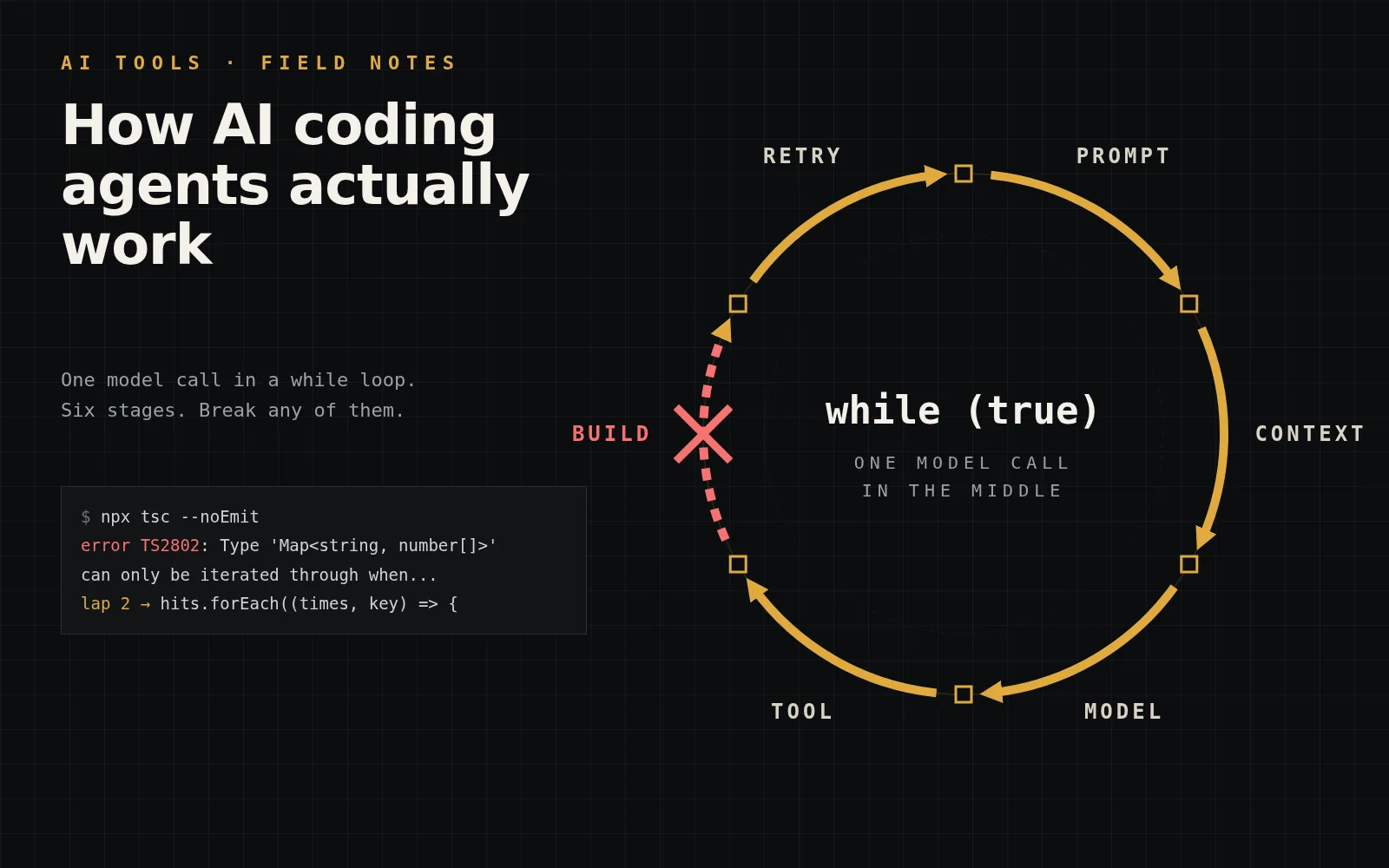
This week an AI agent broke my build with one line of perfectly valid JavaScript. The model was fine. The loop around it never ran my build. Here is that loop, and the five ways I now keep it honest.
Article focus
1 line, 1 red build
A for...of over a Map, on a repo that targets es5. The model never saw the target.
Key takeaways
- 01An AI coding agent is a loop: send the conversation to a model, run the tool it asks for, append the result, repeat until it answers in plain text.
- 02The model never touches your files. The harness does. Every guardrail you want lives in the harness.
- 03The model only knows what is in its context window. If your build target is not in there, it does not exist.
- 04Put the type-check inside the loop, and never let an agent run install or build on code nobody has read.
The one line that broke my build
This week an AI agent spent a session cutting the Vercel bill on this site. Good work, mostly. It cached pages, trimmed middleware and made images cheaper. Then the preview build went red.
The culprit was one line in my chat rate limiter: for (const [key, times] of hits), where hits is a Map. Perfectly valid JavaScript. Also a type error, because my tsconfig.json still targets es5, and TypeScript will not iterate a Map at that target without downlevelIteration.
The fix took one line, hits.forEach(...), in commit ede4158. The lesson took longer. The model did not get JavaScript wrong. It never saw my build rules, because nothing in its loop had run my build.
So here is my whole thesis, up front: agents do not fail at code. They fail at context.
Below is the loop every coding agent runs, drawn as a machine you can step through. Flip "Skip the build step" and you get exactly what happened to me.
Step through the loop. Then break it.
Press Next or Auto-play to run one task through the agent. Then turn on "Skip the build step" and replay it. Click a chapter on the diagram to jump.
Stage
Prompt
Messages
1
Build
not yet
Transcript reconstructed and simplified from PR #54. Line numbers are illustrative.
Is an AI coding agent just a while loop?
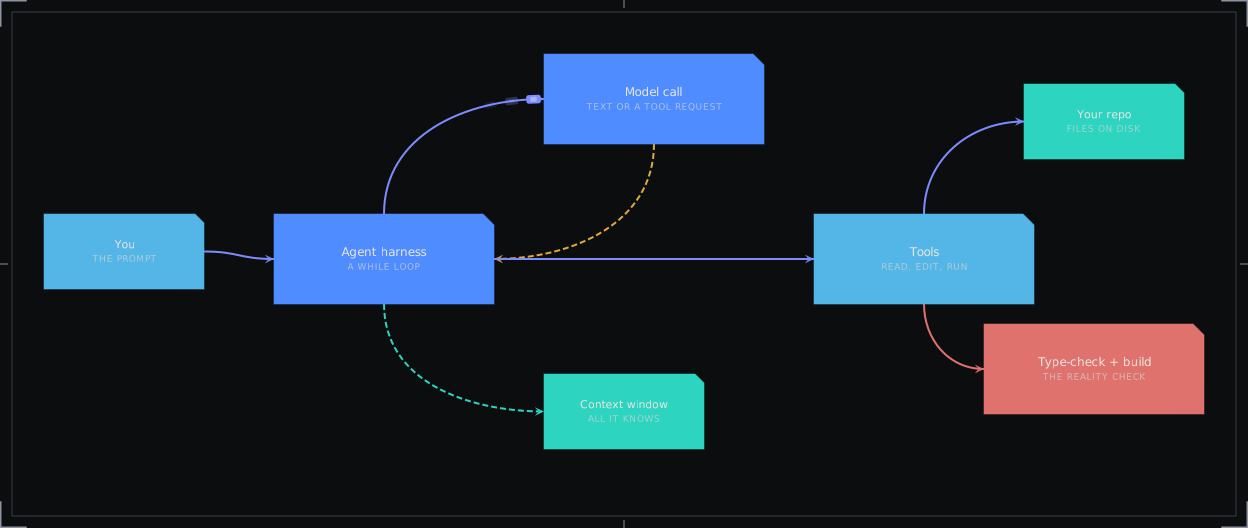
Yes. A harness sends the conversation to a model, the model replies with text or a request to use a tool, the harness runs that tool and appends the result, and it repeats until the model stops asking.
The model is the expensive function in the middle. Everything else is plumbing you could write in an afternoon: a list of messages, a list of tools and a while that keeps going.
Anthropic's docs describe the contract in two lines. The response contains tool_use blocks, and you send the results back as tool_result blocks in the next request (tool use docs). Other providers use the same shape with different field names.
Here is the part people skip. The model never touches your files. It writes a polite request. The harness reads your disk, edits your code and runs your shell. So every guardrail you want lives in the harness, not in the model.
Look at the break below. That is the scariest line in the file. The model decides when the work is done.
typescript
const messages = [{ role: 'user', content: task }];

while (true) {
  const reply = await model.send({ system, tools, messages });
  messages.push({ role: 'assistant', content: reply.content });

  const calls = reply.content.filter((b) => b.type === 'tool_use');
  if (calls.length === 0) break; // plain text: the model thinks it is done

  const results = [];
  for (const call of calls) {
    // The harness, not the model, touches your repo here.
    const output = await runTool(call.name, call.input);
    results.push({ type: 'tool_result', tool_use_id: call.id, content: output });
  }
  messages.push({ role: 'user', content: results });
}
What does the model actually see?
Only what is in its context window right now: the system prompt, the tool definitions, your messages and whatever tool output survived. Your tsconfig, your team rules and your odd build target do not exist unless something put them there.
People talk about agents like they understand the repo. They do not. They understand the slice of the repo that got read into the conversation, and only until it gets pushed out.
Long sessions make it worse. Tool output is bulky. One noisy log can outweigh every source file the agent read. When the window fills up, the harness has to drop or summarise something, and it is usually the old stuff. The tsconfig it read at minute one is old stuff by minute forty.
I would rather have a dumber model with my build rules pinned than a smarter one guessing. Squeeze the window below and watch which file disappears first. Then pin the rule and squeeze again.
Squeeze the context window
Drag the budget down. The oldest things fall out first. Watch what the model writes once tsconfig.json is gone, then pin the rule.
Context window budget
16,760 / 17,000 tokens used
- pinned · System prompt + tool definitions3,200 tok
- pinned · Your prompt60 tok
- tsconfig.json ("target": "es5")300 tok
- README.md2,400 tok
- src/app/api/chat/route.ts1,900 tok
- npm ls output (noisy)6,800 tok
- git diff of earlier edits2,100 tok
hits.forEach((times, key) => { ... })
Fits your build. The model saw the es5 target.
A toy model: token sizes are illustrative and this harness drops the oldest unpinned items first. Real harnesses often summarise old turns instead, and a summary can easily lose a one-line compiler setting.
Guess the next move
Reading an agent transcript feels like watching someone cook through a keyhole. Every move looks obvious after it happens. So predict it first.
Three situations, each one shaped like a real run. Pick what a well-behaved loop does next, then check. The third one is the cheeky one.
Predict the next tool call
Pick before you peek. Each answer explains what a well-built loop does and why.
Round 1 of 3
score 0user: Rename getUser to fetchUser everywhere.
harness: nothing has been read yet.
assistant: ▍ which tool next?
When the repo is the attacker
On 17 November a scan of my main branch turned up a commit I never wrote. It was dated 18 September, pushed under my account, and titled like a normal tidy-up: refactor(header): enhance mobile navigation structure and improve accessibility.
The payload hid in plain sight. The last line of next.config.js looked like module.exports = withNextIntl(nextConfig);. It was actually 16,034 characters long. A wall of tabs pushed an obfuscated loader far past the right edge of any editor. postcss.config.js got the same treatment.
It did not stop there. Every dev, build and start script in package.json had node init && glued to the front, and a hidden .vscode/tasks.json was set to run a script on folder open. All of it is gone now, cleaned out in PR #53.
Now picture an agent opening that repo. The helpful first move is npm install && npm run build, just to see if everything works. That one move runs the dropper. The agent does not need to be malicious. It just needs a shell and good manners.
So the rule is boring and absolute. Never let an agent run install, dev or build on code nobody has read. Read the package.json scripts and the config files first. Grep for eval. Scroll right.
Find what was hiding in my config
The real shapes from the 17 November find, with the payload redacted. Scroll the last line, flip the tabs, then decide what your agent may run.
80};
81
Scroll right
The real line was 16,034 characters long. In a normal editor you see the first 43 and a lot of nothing. Drag the slider all the way.
Your agent asks
run("npm install && npm run build")
How I keep the loop on a leash
None of this makes agents bad. I use them a lot, and I have already written up my Claude Code workflow. It means the loop needs walls, and the walls are cheap.
My rules, in the order I would add them to a new repo:
- Make the agent run the real build once before it edits anything. Now it knows the target.
- Type-check after every edit, not at the end. Same rule as my Claude Code post: no checker, no change.
- Pin build constraints in the instructions file. "target es5, no for...of over Map or Set" is one line. A red build is twenty minutes.
- Never let it edit `tsconfig.json` or the lint config to make an error go away. That is not a fix. That is hiding the body.
- No install, dev or build on a repo nobody has scanned. Read the scripts first.
- Cap the loop. If it has not converged in a handful of laps, it needs me, not another lap.
- Review the diff. Never auto-merge.
Build your leash
Turn rules on and see which incidents each one would have stopped. Copy the result into your own instructions file.
Rules on the leash
Incidents stopped
1/4# AGENTS.md (excerpt) - Open a pull request. Never merge or push to main yourself.
What should I check before merging an agent’s PR?
Check that the type-check and build actually ran inside the loop, that no config was loosened to make an error vanish, and that nothing new runs on install, on build or on folder open.
A green preview is the minimum, not the finish line. PR #54 went green in the end because the loop got a second lap with the error in its context. That is the whole point of this post in one sentence.
If you want the bigger picture on making a codebase agent-friendly, my take is in frontend architecture for AI codegen: the repo is the real prompt. If you do not have a pipeline yet, CI/CD for a React app is the cheapest guardrail you will ever buy.
Context first. Then code.
Services
Need help implementing this?
I build these systems for a living - let's work on yours.
Frontend Development
Production UIs in React, Next.js, or Vue- third-party and payment integrations included. Built for real traffic and maintained in production.
Full Stack Development
End-to-end apps: MERN, React+Node, or MEVN, plus React Native for mobile. Auth, role-based access, and real-time where it matters. Designed to scale without rewrites.
Frontend Architecture & System Design
Structure so teams can ship. Clear boundaries, state strategy, and contracts. New features land cleanly; refactors stay low-risk.
FAQ
Questions people ask
How does an AI coding agent work?
An AI coding agent is a loop run by a harness. The harness sends the conversation and a list of tools to a model. The model replies with text or a tool request. The harness runs the tool, such as reading a file, editing code or running a command, appends the result to the conversation and calls the model again. The loop ends when the model replies without asking for a tool.
Does the model edit my files directly?
No. The model only produces text and structured tool requests. The harness on your machine or server performs the reads, edits and commands. That is why permissions, sandboxes and checks belong in the harness.
Why do AI coding agents write code that breaks my build?
Usually because the build constraint was never in the context window. In my case the agent wrote a for...of loop over a Map, which is valid JavaScript but a TypeScript error (TS2802) when tsconfig targets es5. Running the type-check inside the loop, or pinning the constraint in an instructions file, catches it before a pull request.
Is it safe to let an AI agent run npm install on a repo?
Not on code nobody has reviewed. Install, dev and build scripts run arbitrary code with your shell and environment. In my repo a malicious commit had added node init to every dev, build and start script and hidden a loader after whitespace in next.config.js. Read package.json scripts and config files before letting anything run them.
Your turn
- >Did this help you ship something?
- >Which part clicked the most for you?
- >Applying this at work? Share your experience.
Continue
More engineering notes
 Performance
Improving Next.js Lighthouse Without Killing the Design
How I chase Lighthouse and Core Web Vitals on a real Next.js portfolio without turning the UI into a gray wireframe.
 Frontend
 Architecture for the Age of AI Codegen: Designing Code LLMs Get Right
AI writes most of the boilerplate now. The bottleneck moved to architecture. Here is how to design component APIs, contracts, and guardrails so AI-generated frontend code is correct by construction.
Discussion
Leave a comment
Thoughts, questions, corrections - all welcome.