Engineering note
How JavaScript Actually Executes Your Code: Event Loop & Call Stack Deep Dive
JavaScript is single-threaded, yet it handles timers, network requests, and user events simultaneously. The event loop is the engine behind that trick - and once you see it, async bugs become obvious.
Article focus
Single thread
handling async magic
Key takeaways
- 01The call stack tracks which function is currently executing; only one frame runs at a time.
- 02Web APIs (setTimeout, fetch, DOM events) handle async work off the main thread.
- 03Microtasks (Promise callbacks) always drain completely before the next macrotask runs.
- 04A long-running microtask loop can starve rendering and freeze the UI.
- 05requestAnimationFrame runs after microtasks but before the next paint, making it ideal for animations.
What is the JavaScript Event Loop?
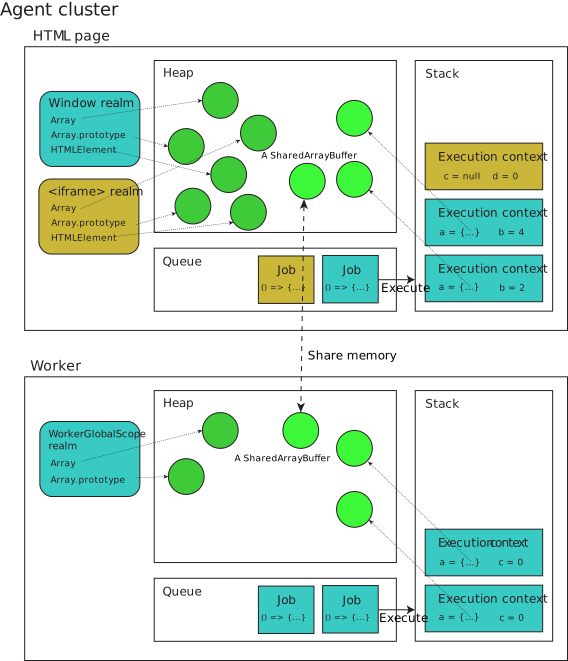
The event loop is a runtime mechanism that continuously checks whether the call stack is empty, then picks the next task from the queues and pushes it onto the stack for execution.
JavaScript runs on a single thread. That means only one piece of code can execute at a time. Yet browsers handle timers, network responses, and mouse clicks without freezing. The event loop is how that works.
Imagine the event loop as a traffic controller standing at an intersection. It watches the call stack and two queues - the macrotask queue and the microtask queue. When the stack is empty, it directs the next waiting task onto the stack. The controller never leaves; it loops forever for the lifetime of the page.
Understanding the event loop is not an academic exercise. Every time you wonder why a setTimeout(fn, 0) runs after a Promise callback, or why your UI freezes during a heavy computation, the answer is the event loop.
Interactive Demo
Step through the execution below to see exactly when each piece of code runs and where callbacks are queued:
Interactive: Event Loop Execution Order
Code
Note: Synchronous code executes immediately
Call Stack
Microtask Queue
Macrotask Queue
Execute console.log("Start")
The Call Stack: How JavaScript Tracks Execution
The call stack is a LIFO (last-in, first-out) data structure that records which function is currently running. Every function call pushes a frame; every return pops one.
When JavaScript starts executing a script, it pushes a global execution context onto the stack. Each function call adds a new frame on top. When that function returns, the frame is popped. The engine always executes the frame at the top of the stack.
Stack overflow is literal - if you recurse too deeply (or forget a base case), you keep pushing frames until the browser throws "Maximum call stack size exceeded". The stack has a finite size, typically a few thousand frames.
javascript
function greet(name) {
  return 'Hello, ' + name;
}

function main() {
  const message = greet('Alice'); // greet pushed, then popped
  console.log(message);           // console.log pushed, then popped
}

main(); // main pushed onto stack

// Stack trace during greet():
// greet    <-- top
// main
// (global)
Web APIs: Where Async Work Actually Happens
Web APIs are browser-provided capabilities (setTimeout, fetch, addEventListener) that run outside the JavaScript engine. When they complete, they push a callback into the task queue.
When you call setTimeout(fn, 1000), JavaScript hands the timer off to the browser's Web API layer and immediately continues executing. The browser runs the timer in its own thread. After 1000ms, the Web API pushes fn into the macrotask queue.
This is critical: the JavaScript engine itself never pauses. It keeps running synchronous code while the browser handles the async work. The callback only executes when the call stack is empty and the event loop picks it up.
Common Web APIs include: setTimeout/setInterval, fetch/XMLHttpRequest, DOM event listeners (click, input, etc.), requestAnimationFrame, and the Geolocation API. All of them follow the same pattern: delegate to the browser, register a callback, continue executing synchronous code.
javascript
console.log('1 - synchronous');

setTimeout(() => {
  console.log('3 - macrotask (ran after stack cleared)');
}, 0);

console.log('2 - synchronous');

// Output:
// 1 - synchronous
// 2 - synchronous
// 3 - macrotask (ran after stack cleared)

// setTimeout(fn, 0) doesn't mean "run immediately".
// It means "run as soon as the stack is empty and no microtasks are pending".
Mental Model: Delivery Analogy
Understand the event loop using a real-world delivery app analogy:
Event Loop Like a Delivery App
Think of JavaScript execution as a delivery app kitchen where the cook processes orders:
Standard Delivery (Macrotasks)
Examples: setTimeout, setInterval, I/O operations
Speed: Regular delivery window (takes longer)
Queue: Standard delivery tickets pile up
Processing: Cook finishes one ticket, then the next
Priority Delivery (Microtasks)
Examples: Promise callbacks, MutationObserver
Speed: Express delivery (faster)
Queue: Priority tickets process immediately after current order
Processing: Cook clears ALL priority tickets before standard ones
The Key Rule
When the cook finishes the current order (synchronous code):
- 1. Process ALL priority delivery tickets (microtasks)
- 2. Then pick the next standard delivery ticket (macrotask)
This is why Promise callbacks always run before setTimeout callbacks!
Example Execution Order:
The Macrotask Queue (Task Queue)
The macrotask queue holds callbacks from Web APIs like setTimeout, setInterval, and I/O events. The event loop processes exactly one macrotask per iteration before checking microtasks.
After each macrotask completes, the browser gets an opportunity to render. This is why breaking heavy work into chunks using setTimeout(fn, 0) can unblock the UI - each chunk is a separate macrotask, giving the browser a render window between them.
Common sources of macrotasks: setTimeout, setInterval, setImmediate (Node.js only), MessageChannel, I/O callbacks, and UI event handlers (click, keydown, etc.).
The queue is FIFO. If you schedule three setTimeout(fn, 0) calls, they run in order. But between each one, the microtask queue drains completely and the browser may render.
The Microtask Queue: Why Promises Beat setTimeout
Microtasks (Promise .then/.catch callbacks, queueMicrotask(), MutationObserver) run immediately after the current task completes and before the next macrotask - the entire microtask queue drains before anything else.
This is the single most important thing to understand about async JavaScript timing. After every task (including macrotasks), the event loop drains the entire microtask queue before moving on. If a microtask queues another microtask, that one runs too - right now, not later.
This is why Promise callbacks always run before setTimeout callbacks, even setTimeout(fn, 0). A resolved Promise queues a microtask, which runs before the next macrotask.
javascript
console.log('1 - sync');

setTimeout(() => console.log('4 - macrotask'), 0);

Promise.resolve()
  .then(() => console.log('2 - microtask'))
  .then(() => console.log('3 - microtask (chained)'));

console.log('1.5 - sync');

// Output:
// 1 - sync
// 1.5 - sync
// 2 - microtask
// 3 - microtask (chained)
// 4 - macrotask

// Entire microtask queue runs before setTimeout callback.
The Event Loop Cycle: A Frame-by-Frame Walkthrough
One event loop iteration: run one macrotask → drain entire microtask queue → render if needed → pick next macrotask. This cycle repeats forever.
Here is the precise order for one loop tick: (1) Pick one task from the macrotask queue. (2) Execute it - this may enqueue microtasks. (3) Drain the entire microtask queue, including any microtasks added during draining. (4) If the browser needs to render (typically every ~16ms at 60fps), run requestAnimationFrame callbacks, then layout, then paint. (5) Go to step 1.
The render step is optional - browsers batch renders. If the stack cleared quickly, the browser may skip rendering this cycle. This is why CPU-bound work that finishes in under 16ms won't cause visible jank.
Node.js uses a slightly different model (libuv) with more queue types, but the same core principle applies: synchronous code first, then microtasks, then the next async operation.
javascript
// Full event loop order demonstration
console.log('script start');               // 1

setTimeout(() => console.log('setTimeout'), 0); // macrotask

Promise.resolve()
  .then(() => console.log('promise 1'))    // microtask
  .then(() => console.log('promise 2'));   // microtask (chained)

requestAnimationFrame(() =>
  console.log('rAF')                       // before next paint
);

console.log('script end');                 // 2

// Output order:
// script start
// script end
// promise 1
// promise 2
// rAF         (varies by browser - typically before next paint)
// setTimeout
Microtask Starvation: When Promises Block Rendering
If you continuously queue new microtasks in a loop, the microtask queue never empties, the macrotask queue never runs, and the browser never gets to render - the UI freezes.
This is a subtle and dangerous pattern. Because the entire microtask queue drains before rendering, an infinite microtask loop is just as bad as an infinite synchronous loop.
The fix is to use macrotasks (setTimeout or scheduler.postTask) to chunk heavy work, giving the browser render opportunities between chunks.
javascript
// BAD: This freezes the browser
function badLoop() {
  Promise.resolve().then(badLoop); // queues another microtask immediately
}
badLoop();

// GOOD: Yields to the browser between chunks
function processChunk(items, index = 0) {
  const end = Math.min(index + 100, items.length);
  for (let i = index; i < end; i++) {
    process(items[i]);
  }
  if (end < items.length) {
    setTimeout(() => processChunk(items, end), 0); // macrotask = render opportunity
  }
}

// Even better: use scheduler.postTask when available
async function processWithScheduler(items) {
  for (let i = 0; i < items.length; i += 100) {
    await scheduler.postTask(() => {
      items.slice(i, i + 100).forEach(process);
    }, { priority: 'background' });
  }
}
requestAnimationFrame and the Rendering Pipeline
requestAnimationFrame callbacks run after microtasks drain but before the browser paints, making them the right hook for DOM mutations that need to sync with the display refresh rate.
rAF gives you exactly one callback per frame (typically 60fps = ~16ms). This makes it far superior to setInterval(fn, 16) for animations - setInterval can drift and fire at wrong times, but rAF is always in sync with the display.
Common mistake: calling rAF inside a microtask expecting it to run before the current frame paints. The microtask runs first, but if that microtask mutates the DOM, the actual pixel painting doesn't happen until the next rAF → layout → paint cycle.
javascript
// Smooth animation - rAF fires once per display frame
let x = 0;
function animate() {
  x += 2;
  element.style.transform = `translateX(${x}px)`;
  if (x < 300) {
    requestAnimationFrame(animate); // schedule next frame
  }
}
requestAnimationFrame(animate);

// Batch DOM reads and writes
function updateUI() {
  // Read phase (avoid layout thrashing)
  const height = element.offsetHeight;

  requestAnimationFrame(() => {
    // Write phase - happens just before paint
    element.style.height = (height + 10) + 'px';
  });
}
Real-World Gotchas: React setState and Async Event Handlers
React batches state updates inside event handlers (synchronous), but before React 18, updates inside setTimeout or Promise callbacks were not batched - each triggered a separate re-render.
In React 18, automatic batching was extended to async contexts. But in older React, calling setState multiple times inside a setTimeout caused multiple re-renders. Understanding the event loop explains exactly why: each setState in a microtask or macrotask is a separate tick.
Another common bug: capturing stale state in async callbacks. Because closures capture the value at the time of creation, a setTimeout callback that reads state will read the value from when the callback was created, not when it fires.
javascript
// React 17: Multiple re-renders in async context
function handleClick() {
  setTimeout(() => {
    setCount(c => c + 1); // re-render
    setName('Alice');     // re-render again (React 17 didn't batch these)
  }, 0);
}

// React 18: Automatic batching everywhere - only one re-render
function handleClick() {
  setTimeout(() => {
    setCount(c => c + 1); // batched
    setName('Alice');     // batched
    // single re-render
  }, 0);
}

// Stale closure problem
function Timer() {
  const [count, setCount] = useState(0);

  useEffect(() => {
    const id = setInterval(() => {
      // BUG: count is always 0 (captured at mount time)
      console.log(count);
      setCount(count + 1);
    }, 1000);
    return () => clearInterval(id);
  }, []); // empty deps = stale closure

  // FIX: Use functional update to avoid depending on captured value
  useEffect(() => {
    const id = setInterval(() => {
      setCount(c => c + 1); // always uses latest value
    }, 1000);
    return () => clearInterval(id);
  }, []);
}
Debugging the Event Loop in Chrome DevTools
The Performance tab records a timeline showing tasks, microtask checkpoints, rendering frames, and scripting time - use it to identify long tasks (>50ms) that block the main thread.
Open DevTools → Performance → Record. Interact with your page, then stop. You'll see a flame chart. Look for long yellow bars in the "Main" thread row - these are long tasks. Each task label shows whether it's a timer callback, event handler, or script evaluation.
The "Tasks" section shows individual macrotasks. Clicking a task expands it to show which functions ran and how long. If a task exceeds 50ms, it's a "long task" (highlighted in red) and will cause noticeable jank.
For microtask debugging, the Sources panel breakpoints work well. Set a breakpoint inside a Promise .then callback, then check the Call Stack panel - you'll see "Async" markers showing the original async boundary.
Mental Model: The Complete Picture
Think of JavaScript execution as a kitchen: one cook (the engine) handles orders from three windows - synchronous code (verbal orders), the microtask window (urgent tickets), and the macrotask window (standard tickets). Urgent tickets always clear before standard ones.
This mental model makes async ordering predictable. Synchronous code runs first (verbal orders are immediate). When it finishes, all urgent tickets (microtasks: Promises, queueMicrotask) are handled before any standard ticket (macrotask: setTimeout, events).
The cook also checks the board (rendering) periodically between standard orders. If there's nothing new to paint, the check is skipped. If urgent tickets keep coming in without a break, standard tickets and the board check are perpetually delayed.
With this model, you can predict the output of any async JavaScript snippet. List all synchronous code first, then all pending microtasks in order, then macrotasks. Any microtask queued by a microtask runs before the next macrotask.
Mental Model: The Complete Picture
Event Loop Workflow
Here is the complete flow of how JavaScript processes code and tasks:
Key Insight:
The event loop is a continuous cycle that checks the call stack, drains microtasks, picks one macrotask, renders if needed, and repeats. This ensures smooth execution and responsive UIs.
Your turn
- >Did this help you ship something?
- >Which part clicked the most for you?
- >Applying this at work? Share your experience.
Continue
More engineering notes
 Frontend
JavaScript Closures Explained: Why Your Functions Remember Everything
Learn JavaScript closures with interactive demos. Covers lexical scope, the var vs let loop bug, stale React hooks, memory leak patterns, and closure interview questions.
 AI
AIThe Ultimate Guide to Free AI API Keys: 6 Platforms You Need to Know
Free AI API keys from OpenRouter, Groq, Google AI Studio, NVIDIA Build, GitHub Models, and Cloudflare Workers AI - rate limits, working provider combos, and key hygiene explained.
Discussion
Leave a comment
Thoughts, questions, corrections - all welcome.