Improving Next.js Lighthouse Without Killing the Design
Scores are a side effect. I care about what someone feels in the first second. Here is how I optimize that path and still keep gradients, type, and motion.

Article focus
90-100
Target Lighthouse range
Photo by Pixabay on Pexels
Key takeaways
- Attack above-the-fold work and LCP before you polish far below the scroll.
- Defer or idle-load decoration so the first paint still feels expensive.
- Treat `sizes`, `priority`, and third parties like a budget, not a free buffet.
What should I fix first when Lighthouse hurts but I still want a designed hero?
Start with whatever actually paints above the fold (your real LCP element), then cut main-thread JavaScript before you strip visual personality.
The score is a mirror. The user is the customer. I open DevTools like a grumpy editor and ask what a stranger sees before they scroll, before they click, before they care about my footer.
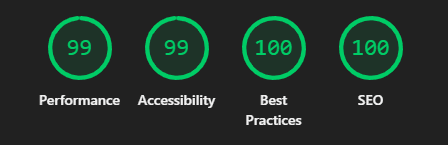
On marketing sites that usually means the hero image or headline block, plus whatever script thinks it is the main character. Lighthouse will happily let you micro-optimize a chart that nobody sees while the hero still loads like molasses.
So I map LCP, first paint, and long tasks in that order. If you only do one thing, make the first screen honest. Everything else can wait.
Can I keep gradients and motion without failing Web Vitals?
Yes, if the heavy work runs after first paint, on idle, or when the user scrolls, not in the initial bundle for the hero.
I am not interested in a fast site that looks like a PDF. I want both. The trick is sequencing.
Ship a static-looking first frame that already has strong type, spacing, and color. Then let Framer Motion, charts, and chatty widgets hydrate when the browser has room or when the user proves they are staying.
If your animation runs before the LCP node settles, you are racing yourself. I have lost that race plenty of times. Now I treat motion as dessert.
- Paint the core layout and hero copy without waiting on optional JS.
- Hydrate interactive extras after `requestIdleCallback`, a short timeout, or a scroll threshold.
- Keep typography and spacing premium so the page still feels finished before extras arrive.
What does my personal Lighthouse checklist look like?
Hero first, then real images (`sizes` + `priority`), then third parties, then fonts, then CLS risks. Repeat on every deploy.
Checklists beat heroics. When I am tired, I still follow a list, because regressions love midnight deploys.
tsx
import Image from 'next/image';

const HERO_IMAGE = {
  src: '/images/placeholder-hero.jpg',
  alt: 'Placeholder hero image',
};

export function HeroImage() {
  return (
    <Image
      src={HERO_IMAGE.src}
      alt={HERO_IMAGE.alt}
      width={640}
      height={360}
      priority
      sizes="(max-width: 768px) 100vw, 640px"
      quality={75}
      className="w-full max-w-[640px] rounded-2xl object-cover"
    />
  );
}- Hero: keep first-paint JS boring; CSS carries most of the drama.
- Images: one `priority` candidate, honest `sizes`, compression you can explain.
- Third parties: load on interaction or idle, never as an uncapped parallel grab.
- Fonts: fewer families and weights beat a trophy case of faces.
- Layouts: reserve space for media and widgets so CLS stays boring.
When do analytics and chat widgets earn a slot on my page?
Only when I can name the decision they inform, and I load them after the first meaningful paint or on a deliberate user action.
I have watched a 40 KB marketing page balloon because five vendors all wanted to be first in line. None of them thanked me when LCP crossed three seconds.
If a script does not change what I ship next week, it does not get to compete with the hero. Harsh, but fair.
When I keep a tool, I give it a trigger. Scroll depth, idle timer, second visit, or an explicit “open chat” tap. The page stops paying rent for toys nobody touched.
What happened when a pretty hero blew my LCP?
A full-width animated WebP hero kept LCP above 3.5s until I prioritized decode for that node and deferred motion there; after that, LCP sat near 1.1s with the same pixels on screen.
Last quarter I shipped a hero that looked incredible in Figma and embarrassing in WebPageTest. The filmstrip was basically “blank, blank, blink, art direction.”
I stopped treating `priority` as decoration. One image owned LCP. I matched `fetchPriority` to that reality and delayed entrance animation until the bitmap was ready.
Same gradient. Same copy. Different patience from the browser. Users do not compliment LCP, they just stay.
Where do people waste next/image and the priority flag?
They omit `sizes`, mark half the page as `priority`, or hydrate decorative motion before the LCP node finishes.
I have been that person. Five “hero” images, each screaming for bandwidth, and Lighthouse laughing in the corner.
- Spraying `priority` so nothing is actually prioritized.
- Skipping `sizes` so mobile pulls a desktop-sized asset.
- Hydrating heavy motion for content that could stay CSS-only.
- Letting Tag Manager or chat load before the first contentful paint.
On this site
These pages expand on how I work with teams, what I ship, and how to hire me for the same kind of execution.
Recommended blogs
Continue reading

SEO, AEO, and GEO for a Modern Developer Portfolio
How I structure a portfolio so Google, featured snippets, and AI crawlers can all quote me without me sounding like a keyword vending machine.
Photo by Mikhail Nilov on Pexels
Read article
Shipping React UI Fast Without Making a Mess
The way I structure React and Next.js UI so the team ships fast because the system is obvious, not because we skipped every guardrail.
Photo by Zak Chapman on Pexels
Read article