Engineering note
The Best Free AI Coding Agents in 2026 (After Gemini CLI's Free Tier Ended)
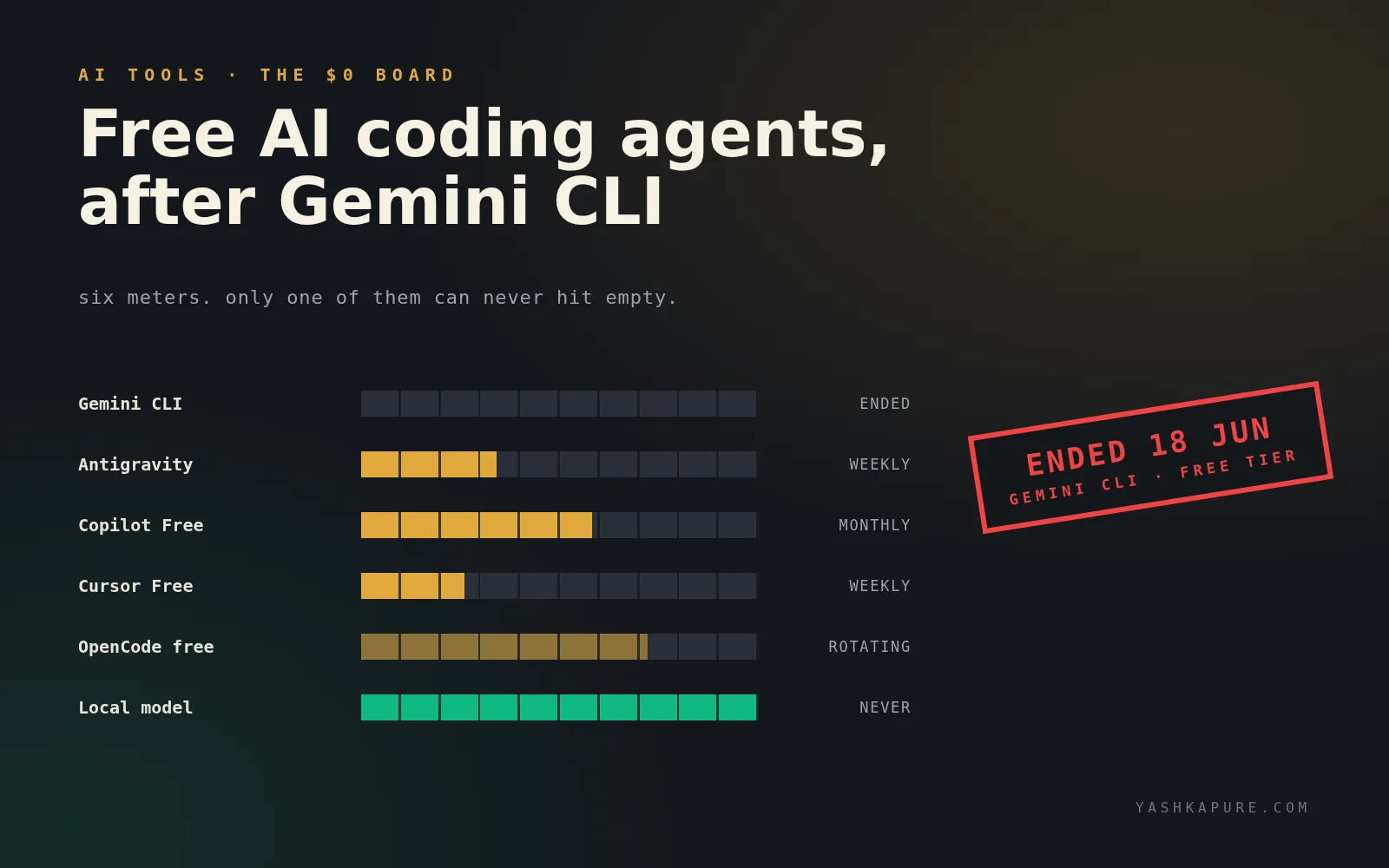
Gemini CLI's free tier ended on 18 June. Every free option since then shares one catch: the limit is a feeling, not a number. Here is what $0 buys today, when each plan resets, and how to keep working when the wall hits.
Article focus
1,000 to 0
Requests a day a personal Google account got from Gemini CLI at launch, and after 18 June 2026.
Key takeaways
- 01Gemini CLI stopped serving free Google accounts on 18 June 2026. Google's free route now is Antigravity, on a weekly quota whose size is not published.
- 02Free in 2026 means a pool that resets, not a number you can plan around. Copilot Free resets monthly, Antigravity and Cursor Free weekly, OpenRouter daily.
- 03Free hosted models rotate. Four of the twelve free OpenCode models from 5 November were gone by 23 November.
- 04A local model is the only floor that never runs out, but OpenCode needs a 64k context and Ollama defaults to 4k on under 24 GiB of VRAM.
- 05Nothing hands your task to the next tool for you. Treat $0 as three or four tiers you rotate, plus a local fallback.
What happened to the free Gemini CLI?
Google stopped serving Gemini CLI to free personal accounts on 18 June 2026. The free route now is Antigravity CLI, which runs on a weekly quota. Free AI coding is not dead. It just stopped being a number you can plan around.
Here is my opinion up front. Free AI coding is not dead. What died is the free tier you could do arithmetic on.
At launch, Gemini CLI gave a personal Google account 60 requests a minute and 1,000 a day. Google announced the end on 19 May. On 18 June it stopped serving free accounts, and "Login with Google" stopped working.
The replacement is Antigravity, and its free plan has a "baseline agent quota refreshed weekly". No size. Google says the limits track the work the agent does, so a quick fix costs a sliver and a refactor costs a slab.
That is the pattern across every free plan below. I read each vendor page today, and I will say what is published and what is not.
On 9 October my Grok Bot plan's included usage did not cover the cloud coding agent. The repo cleanup (removing pricing and Stripe, after malware was found) waited until the subscription renewed.
Scrub the timeline first.
Scrub the free tier
Drag the slider from launch day to next week and watch what a free Google account gets.
Scrub the free tier
Free requests, personal Google account
1,000 requests a day, 60 a minute
Gemini CLI launches
Sign in with a personal Google account and you get the no-charge limits Google announced at launch. No card, no key.
Google launch postWhat does $0 actually include today?
Antigravity gives you an agent with a weekly quota. Copilot Free gives 2,000 completions a month and limited chat and agent credits, on auto model selection only. Cursor Free gives limited agent, chat and tab on Cursor models. OpenCode runs free hosted models that rotate. A local model has no quota at all.
Copilot Free is the only plan here with a hard number: 2,000 completions a month. Chat and agent usage draw on an AI-credit allowance that GitHub does not size, and you get auto model selection only.
Cursor now sells through The X Subscription. Its Free plan is "limited" Agent, Chat and Tab, with Cursor models (Grok and Composer) and no third-party models. The old Hobby plan still works for people who have it.
OpenCode is the open-source terminal agent. Its console lists models priced free "for a limited time", and the free chat models only work inside OpenCode.
Now the useful part. The right free tool depends on what you refuse to give up. Tick your must-haves and watch the list shrink.
Strike tools off your list
Tick your must-haves. Every tool that cannot meet one is struck off, with the reason.
Disqualify the field
Tick what you cannot live without. Each tool that fails a must-have gets struck off, with the reason.
- Antigravity (free)
- Copilot Free
- Cursor Free
- OpenCode + free models
- OpenRouter :free
- Local (Ollama)
Tick at least one must-have.
When does each free plan come back?
Copilot Free credits reset at 00:00 UTC on the 1st of each month. Antigravity and Cursor Free refresh weekly. OpenRouter free models are capped per day: 50 requests a day until you have bought $10 of credits, then 1,000. OpenCode free models publish no cap.
A reset window matters more than the size of the pool. A monthly pool that runs dry on the 9th means three weeks of nothing. A weekly pool that runs dry on Tuesday means five days.
GitHub is the only vendor that gives a date: credits reset at 00:00 UTC on the first day of each month, whatever your billing date is. OpenRouter is explicit too: free models allow 20 requests a minute, and 50 a day until you have bought $10 of credits, which lifts the cap to 1,000 a day.
Google does not say which day the Antigravity week starts. On a free plan that matters: a heavy morning can cost you the week, and you cannot plan around a day you do not know.
The widget below only uses limits the vendors publish. Where there is no number, it says so and refuses to guess.
How long is the blackout?
Choose your tools and the day you run out. The widget only uses limits the vendors actually publish.
Hit the wall
Say every tool you hold runs dry on the same day. How long until anything works again? Pick your tools, then move the day of the month.
- Antigravityup to 7 days
Resets weekly. Google does not say which day the week starts, so plan for the worst case.
- Copilot Freeup to 19 days
Resets monthly, 00:00 UTC on the 1st. The one tool here with a date you can put in a calendar.
Worst case: 7 days with nothing. That is the soonest any of your tools refreshes.
What do I do when the wall hits?
You switch tools by hand. None of these agents hands your task to the next one. Spend the weekly pool first, keep a monthly pool for hard tasks, use OpenRouter or OpenCode free models for small ones, and keep a local model as the floor that never runs out.
Think of it as a fuel stop route. Empty is a message in the UI, not an outage. The only question is which tool you open next.
My order is simple. Weekly pools first, because unused quota there is wasted on reset day. Monthly pool next, because it is the one you can ration. Daily and rotating pools for small tasks. Local last, because it never runs out.
Mark tools empty below and watch where one task lands. Then step through the five chapters under the diagram.
Be the router
Mark tools empty and watch one task fall through the chain. Step through the five chapters below the diagram.
Fall through the chain
Mark a tool empty. The packet walks down the chain to the first one with quota left. Nothing does this for you. You are the router.
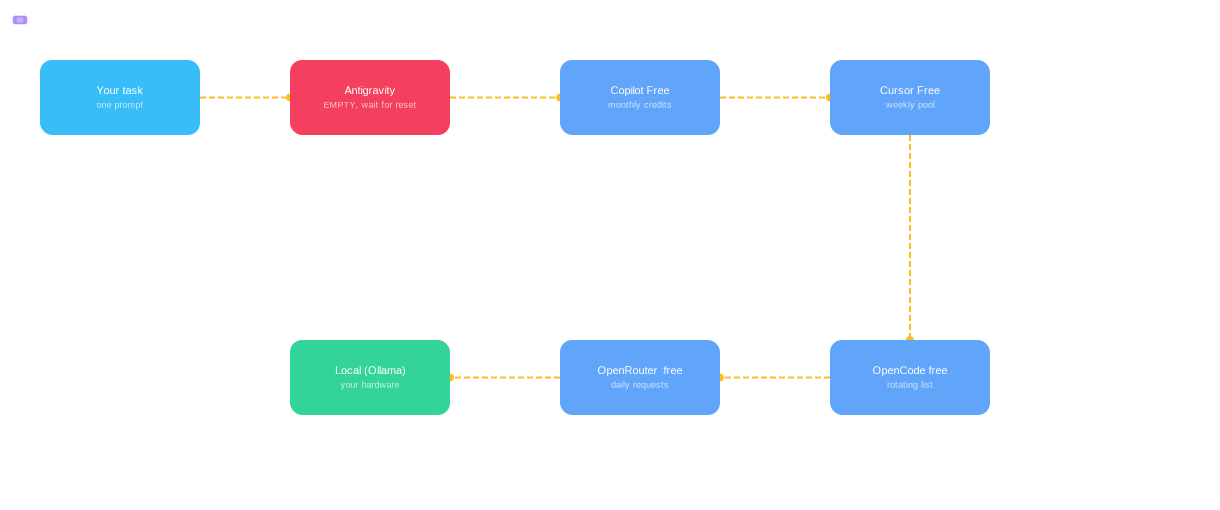
Your task lands on Copilot Free.
Why do free models keep disappearing?
Free hosted models are a marketing and feedback phase, so they are free "for a limited time". On 5 November OpenCode listed 12 free models. By 23 November four of those were gone and three new ones had arrived.
OpenCode says it outright: each free model is available "for a limited time" while the team collects feedback. The count of free rows went from 14 on 20 October to 10 on 25 October, back to 12 on 5 November (a third-party tracker, so treat the history as theirs). The docs page today lists 11.
Three habits cost nothing. Pin the model per project, not globally. Read the data note on the model before you send it code, because some free models may use your data to improve themselves while others keep nothing. Keep one local or paid fallback connected.
Also read the name on the box. One of the free models in that list is Jev, which returns structured yes/no decisions, not code. Free is not the same as useful.
Pin a model from the 5 November list below and guess.
Would it still be free?
Pin a model from the 5 November list, guess, then see what happened by 23 November.
Pin a free model, then fast forward
This was OpenCode's free list on 5 November. Pin the one you would have built your workflow on. Then guess if it is still free today.
Of these 12, 8 are still listed free today and 4 are not. Count of free rows on the docs page by date:
Can a local model be the floor?
Yes, if you set the context window. OpenCode needs at least 64k tokens of context. Ollama defaults to 4k on under 24 GiB of VRAM, 32k on 24 to 48 GiB and 256k above that, so most laptops need an override.
A local model is the only option here with no quota, no account and no data leaving your machine. It is also slower, and smaller than the hosted models.
The setup is short. Ollama ships an OpenCode integration: run ollama launch opencode, pick a model that supports tools, and set the context.
The trap is silent. Ollama documents a default context set by your VRAM, and says agents and coding tools should have at least 64,000 tokens. With a 4k window the model still answers. It just cannot hold the files the agent reads. Nothing errors, so it looks like the model is bad.
Break it on purpose below. Then run ollama ps on your own machine and check the CONTEXT column.
bash
# 64k context minimum for OpenCode
OLLAMA_CONTEXT_LENGTH=64000 ollama serve

# in another terminal
ollama launch opencode

# check the context and that the model runs on the GPU
ollama ps
Break a local agent on purpose
Pick your GPU memory and see why a local model can answer fine and still fail as an agent.
Will my local agent see enough?
Pick your GPU memory. Ollama picks a default context window from it. OpenCode needs at least 64k.
Too small. 4k is about 1/16 of the 64k minimum. The model still answers, so nothing looks broken. It just cannot hold the files the agent reads.
ollama serve # default for your VRAMWhat would I run for $0?
Use Antigravity first, Copilot Free for ration-worthy hard tasks, an OpenCode free model or OpenRouter for small ones, and a local model as the floor. Treat it as a trial of each, not a plan, and have a $10 answer ready for the day you need a limit you can trust.
This is the shape I would start from, and the order matters more than the names. Weekly pool, then monthly pool, then daily and rotating, then local. Every name in that sentence can change by next month.
Free tiers are a trial, not a plan. If your income depends on a tool, pay the $10 for a limit you can read.
If you want the API-key side of the same idea, my free AI API keys guide covers OpenRouter, Google AI Studio and the rest. For what the agent is actually doing under the hood, read how AI coding agents work.
Before you trust any of this, check the pages yourself. They change weekly, and so does this post.
Services
Need help implementing this?
I build these systems for a living - let's work on yours.
Frontend Development
Production UIs in React, Next.js, or Vue- third-party and payment integrations included. Built for real traffic and maintained in production.
Full Stack Development
End-to-end apps: MERN, React+Node, or MEVN, plus React Native for mobile. Auth, role-based access, and real-time where it matters. Designed to scale without rewrites.
Frontend Architecture & System Design
Structure so teams can ship. Clear boundaries, state strategy, and contracts. New features land cleanly; refactors stay low-risk.
FAQ
Questions people ask
Is Gemini CLI still free?
Not for personal Google accounts. Google stopped serving Gemini CLI to free accounts, Google AI Pro and Google AI Ultra on 18 June 2026. Free users are directed to Antigravity CLI. Paid Gemini API keys and company licences still work.
Is Google Antigravity free?
Yes. The individual plan is $0 a month with a baseline agent quota that refreshes weekly. Google does not publish the quota size. Claude Sonnet 4.6, Claude Opus 4.6 and GPT-OSS-120b are listed on the free plan with a note that they will be removed on 30 November 2026.
What does GitHub Copilot Free include?
Copilot Free includes 2,000 code completions a month and a limited allowance of AI credits for chat and agent usage, with auto model selection only. Credits reset at 00:00 UTC on the first day of each month.
Are OpenCode free models really free?
The models marked Free in the OpenCode console cost nothing, but each is free for a limited time and the list changes often. Some free models may use your data to improve themselves, so read the data note for each one before sending it code.
Can I run a free AI coding agent locally?
Yes. OpenCode works with Ollama, and a local model has no quota. OpenCode needs a context window of at least 64k tokens, while Ollama defaults to 4k on GPUs with under 24 GiB of VRAM, so set OLLAMA_CONTEXT_LENGTH=64000 first.
Your turn
- >Did this help you ship something?
- >Which part clicked the most for you?
- >Applying this at work? Share your experience.
Continue
More engineering notes
 AI Tools
How to Build an MCP Server from Scratch (Step-by-Step for Beginners)
A practical beginner guide to building a local MCP server (stdio) step-by-step. You will run a working server, connect it to Claude Desktop, and call your first tool.
 Engineering
Onboard to Any Git Repo Fast: 5 Commands Before I Read Code
Five git commands I run before reading any code: find churn hotspots, map ownership risk, spot bug clusters, read delivery cadence, and detect firefighting patterns in minutes.
Discussion
Leave a comment
Thoughts, questions, corrections - all welcome.