Engineering note
How a Next.js App Router Request Actually Works (Replay One)
My home page was 54% of my Vercel CPU. It had no database and no API calls. It was rendering from scratch for every visitor, bots included. Here is the path one request takes, and the three switches that decide what it costs.
Article focus
54% of my CPU
One page with no database, rendered from scratch on every request. 449.8 s of Active CPU in four days.
Key takeaways
- 01A request goes middleware, then cache, then (only on a miss) router, RSC render and stream. The cache is the only step that is free.
- 02One dynamic API in a shared layout makes every page under it dynamic. Mine was next-intl reading request headers because I never called setRequestLocale.
- 03revalidate does not mean "render every N seconds". It means "the first visitor after N seconds gets the old page and triggers one background render".
- 04Middleware runs before the cache, so it costs CPU on cache hits too. Shrink the matcher before you tune anything else.
Two curl commands, one bill
I opened my Vercel usage page this week and found a portfolio site burning CPU like a SaaS. 4,564 seconds of Fluid Active CPU in 30 days, across 69,594 invocations. For a site whose job is to say "hire me".
Over 16 to 20 November the worst offender was the home page, /[locale]. 449.8 seconds out of 828.9. That is 54% of the bill from one page that reads no database and calls no API. About 108 ms of CPU per visit, 4,174 times.
The headers told the whole story. Before the fix, curl -sI /en/ came back private, no-cache, no-store with x-vercel-cache: MISS. Every visitor got a fresh render. More than half of those visitors were bots, and bots do not even scroll.
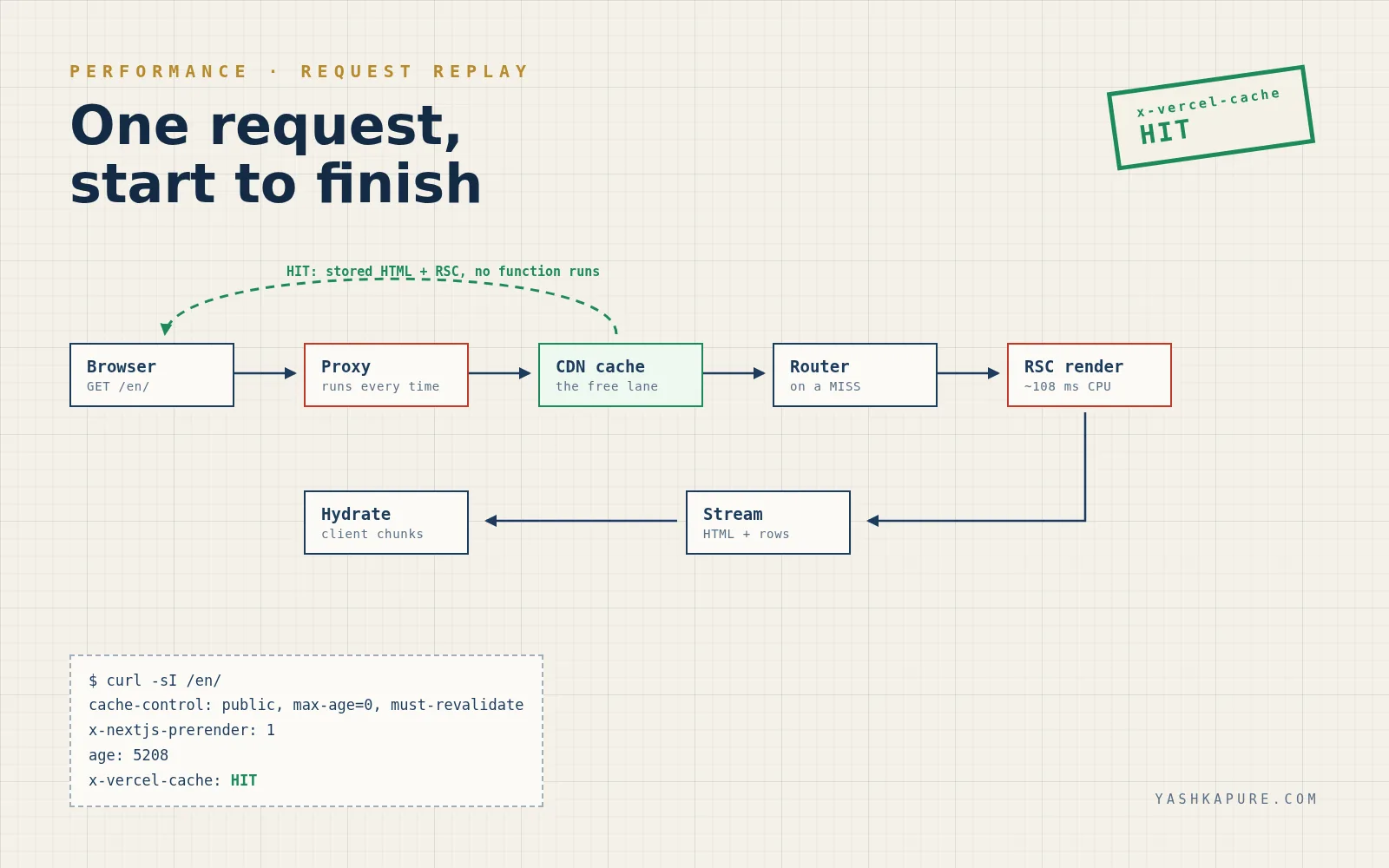
After PR #54 the same URL returns x-nextjs-prerender: 1, age: 5208 and x-vercel-cache: HIT. The page now comes out of the CDN like a static file, because it is one.
Flip the receipt below. Then let me show you the path a request takes, because once you can see it, the bill stops being a mystery.
Read the receipt
The real response headers for my home page, before and after PR #54. Flip between them.
Same URL, same day
My home page, before and after one pull request.
Response
$ curl -sI https://www.yashkapure.com/en/
HTTP/2 200
cache-control: public, max-age=0, must-revalidate
x-nextjs-prerender: 1
age: 5208
x-vercel-cache: HIT
Served from the CDN cache. No function ran. Captured 20 Nov 2026, 13:47 (UK time).
What happens when you request a Next.js App Router page?
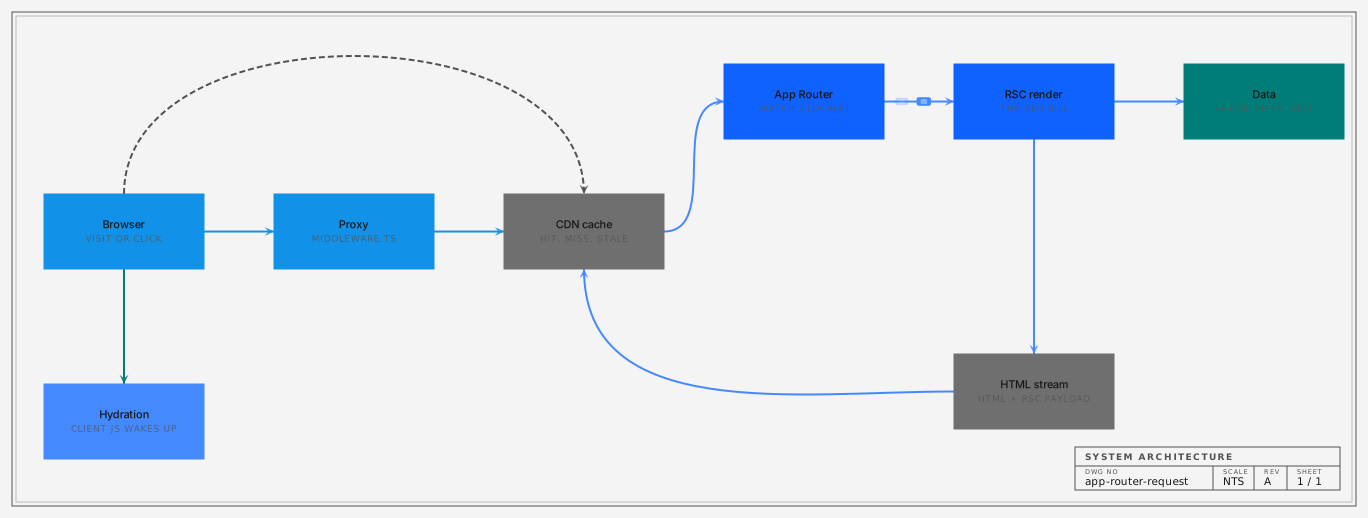
Middleware runs first, then the CDN cache is checked. On a HIT the stored HTML or RSC payload goes straight back. On a MISS the router matches the route, React Server Components render it, the result streams to the browser, and the client hydrates. Static routes store that result for the next visitor. Dynamic routes throw it away.
Think of it as a toll road with one free lane. Middleware is the toll booth. The cache is the free lane. Everything after the cache is the expensive bit: routing, data fetching and the RSC render.
On Vercel, Routing Middleware "runs globally before the cache" (Vercel docs). Next.js 16 renamed the file from middleware to proxy for the same reason: it is a network hop in front of your app (proxy docs). My repo still has the old name. It still works. It still costs.
So why was my home page dynamic? Not because of anything on the page. The shared [locale] layout called next-intl without setRequestLocale, so next-intl read the locale from request headers. Reading headers is a dynamic API. One call in a layout, and every page under it renders per request.
The fix was three exports and one function call: generateStaticParams for the 10 locales, dynamicParams = false, revalidate = 86400, and setRequestLocale(locale) before any next-intl call. Play with the same switches below.
typescript
// src/app/[locale]/layout.tsx (simplified from PR #54)
export const dynamicParams = false;
export const revalidate = 86400; // one day

export function generateStaticParams() {
  return locales.map((locale) => ({ locale }));
}

export default async function LocaleLayout({ children, params }) {
  const { locale } = await params;
  setRequestLocale(locale); // without this, next-intl reads headers = dynamic
  const messages = await getMessages({ locale });
  // ...
}
Replay one request
Pick a route type, a cache state and whether middleware matches. The flows on the diagram and the CPU cost change with every switch.
Route
Cache entry
Middleware matcher
x-vercel-cache
RSC render
Function CPU
Middleware
A model of the documented behaviour, not a live trace. The 108 ms is my home page's average function CPU per invocation from 16 to 20 Nov 2026 (449.8 s over 4,174 invocations). Middleware cost per call was not measured, only its total.
What actually comes down the wire?
Two things. The first visit gets HTML with the RSC payload inlined in script tags, so the page paints before JavaScript runs. Link clicks after that fetch the RSC payload on its own, a line-based stream of React rows, not HTML.
I measured mine. The /en/ HTML is 626,082 bytes raw and 72,180 bytes with brotli. The RSC payload for the same page, fetched with the RSC: 1 header, is 103,844 bytes.
Open that payload and it reads like a shipping manifest. 1:"$Sreact.fragment" declares a React primitive. 2:I[79520,[...]] says "this is a client component, its code is in these chunks". :HL[...css] tells the browser to preload a stylesheet. The server component code itself never ships. Only its output does.
That is the trick that makes the App Router feel fast. The browser gets a description of the tree, row by row, and can start painting and fetching chunks before the last row lands.
It is also why a static route is so cheap. Both the HTML and the RSC payload are just files once they are cached. Replay the exchange below and click any step to inspect it.
Step through the wire
Press play or step through the exchange between browser, edge and server. Click any step to inspect what is on the wire at that moment.
on the wire
Press play or step through the sequence. This panel shows what is on the wire at each arrow. Sizes and headers are real, from my site on 20 Nov 2026. Payload rows are trimmed.
When does Next.js serve HIT, MISS or STALE?
HIT means the cached copy was fresh and served as is. MISS means nothing usable was cached, so the function rendered it. STALE means the cached copy was older than revalidate: the visitor still gets it instantly, and one background render refreshes it. PRERENDER means it was served from the build output.
Vercel lists six values for x-vercel-cache: HIT, MISS, STALE, PRERENDER, REVALIDATED and BYPASS (response headers). On a static route you mostly see HIT and STALE. On a dynamic one you see MISS forever.
Here is the bit people get wrong. revalidate = 60 does not mean "render every 60 seconds". Nothing runs on a timer. The first request after 60 seconds gets the old page, and that request triggers one render in the background. That is stale-while-revalidate (ISR guide).
So the cost of revalidate is capped by traffic and by the window, whichever is smaller. A page with 1,000 visits a day and a one-day window renders about once a day per locale. Make it dynamic and it renders 1,000 times.
My 16 to 20 November cache split was HIT 21.5%, MISS 48.5%. That MISS share is the cost of dynamic, in one number. Drag the traffic slider and see where your own page lands.
What does revalidate cost?
Drag the traffic and pick a revalidate window. Count the renders a day, then compare with dynamic.
Requests per day to one page
1,040 / day (about my home page, 16 to 20 Nov)
export const revalidate
Renders / day
1,040
Render CPU / day
112 s
Most responses
100% of the fully dynamic cost
Rough model: at most one regeneration per window, 108 ms each (my measured average). Real ISR regenerates per region and per locale, and a bot crawl does not care about your averages. Middleware is not in this number.
Does middleware run on cached pages?
Yes. Middleware runs before the cache, so it executes on cache hits, prefetches and bot traffic unless the matcher excludes them. Its CPU is separate from the page render and does not drop when your pages become static.
This one stung. My middleware is next-intl doing locale detection. It used 536.8 seconds of CPU over 13 to 16 November and 391.0 over 16 to 20 November. Static pages do not touch that number. Only the matcher does.
Middleware is a toll booth that charges on cache hits too. The cheapest middleware run is the one that never happens.
The matcher already skipped api, _next, _vercel and anything with a file extension. PR #54 added a missing condition, so link prefetches skip it as well. next-intl links already carry the locale, so there is nothing to redirect. Next.js prefetches links in the viewport by default (linking docs), and on a page full of links that adds up.
Type a few paths below. The regex is the real one from my middleware.ts.
typescript
export const config = {
  matcher: [
    {
      source: '/((?!api|trpc|_next|_vercel|.*\\..*).*)',
      missing: [
        { type: 'header', key: 'next-router-prefetch' },
        { type: 'header', key: 'purpose', value: 'prefetch' },
      ],
    },
  ],
};
Does middleware run on this path?
Type a path and toggle the prefetch header. This is the real matcher from my repo.
Try your own path
Middleware runs: path matches and no prefetch header.
So what did the fix actually save?
Honest answer: I do not have the after numbers yet. The home page now returns x-vercel-cache: HIT with x-nextjs-prerender: 1, so its render cost per cached visit is zero. I will re-check the usage page on 24 November before I claim a percentage.
I could put a big "CPU down 80%" here. I would be making it up. What I know is that the page that was 54% of the bill is now served from cache, and a cached page does not run a function.
What I also know: at least 14,358 of 28,538 requests in those four days came from identified bots. Bots love dynamic pages. They never warm a cache you do not have.
Here is the rule I use now. Default to static. Make every dynamic route justify its CPU. If a page reads no request data, it has no business rendering per request.
If you want the other half of this week, the AI agent that broke my build while doing this fix has its own post. Check your own headers first, though. curl -sI costs nothing.
What still costs CPU?
My /en/ page is a cache HIT. Does middleware run?
revalidate = 86400 and the page was built 25 hours ago. The next visitor gets...
A <Link> prefetch on my site. Does middleware run?
Services
Need help implementing this?
I build these systems for a living - let's work on yours.
Frontend Development
Production UIs in React, Next.js, or Vue- third-party and payment integrations included. Built for real traffic and maintained in production.
Full Stack Development
End-to-end apps: MERN, React+Node, or MEVN, plus React Native for mobile. Auth, role-based access, and real-time where it matters. Designed to scale without rewrites.
Frontend Architecture & System Design
Structure so teams can ship. Clear boundaries, state strategy, and contracts. New features land cleanly; refactors stay low-risk.
FAQ
Questions people ask
What happens when a request hits a Next.js App Router page on Vercel?
Middleware runs first, then the CDN cache is checked. On a cache hit the stored HTML or RSC payload is returned with no function running. On a miss the router matches the route, React Server Components render it, the response streams to the browser and the client hydrates. Static routes store the result for the next visitor.
What do x-vercel-cache HIT, MISS and STALE mean?
HIT means a fresh cached copy was served. MISS means nothing usable was cached and the response was generated. STALE means a cached copy older than its revalidate window was served while one background render refreshed it. Vercel also uses PRERENDER, REVALIDATED and BYPASS.
Does Next.js revalidate re-render a page on a timer?
No. With revalidate set, the first request after the window ends still gets the cached page and triggers one regeneration in the background. If nobody visits, nothing renders.
Why is my Next.js page dynamic when it has no data fetching?
Usually something in a shared layout reads request data, such as headers, cookies or search params. With next-intl, forgetting setRequestLocale in the locale layout makes it read headers, which opts every page under that layout into dynamic rendering.
Does Next.js middleware run on cached pages?
Yes. Middleware runs before the cache, so it executes on cache hits too unless the matcher excludes the path. Excluding static files and link prefetches in the matcher is the cheapest way to cut middleware CPU.
Your turn
- >Did this help you ship something?
- >Which part clicked the most for you?
- >Applying this at work? Share your experience.
Continue
More engineering notes
 Frontend
How React Knows What to Re-render: The Reconciliation & Diffing Algorithm
Learn React's reconciliation algorithm: virtual DOM diffing, key prop rules, render vs commit phases, React 18 batching, and concurrent rendering - from first principles to production patterns.
 Performance
Improving Next.js Lighthouse Without Killing the Design
How I chase Lighthouse and Core Web Vitals on a real Next.js portfolio without turning the UI into a gray wireframe.
Discussion
Leave a comment
Thoughts, questions, corrections - all welcome.